HuiStack: Full-Stack Chinese Learning Platform

Sean McHale
Team: Solo
Status: OngoingTags:
Built a full-stack Chinese learning platform that turns Chinese text, subtitles, and video into interactive lessons, dictionary study, AI explanations, flashcards, and exportable review decks.
Overview
HuiStack is a production full-stack web application for Chinese language learners. The core idea is simple: take real Chinese media and convert it into learning material that is much more interactive than a static transcript or a flashcard deck. Instead of separating reading, listening, vocabulary, and review into different tools, HuiStack keeps them connected inside a single workflow.
I deployed the production application to huistack.com on a Hetzner VPS using Dokploy. That setup gives me Git-based automatic builds, containerized services, persistent PostgreSQL storage, automated database backups, and S3-compatible object storage for audio, video, and generated media.
What It Does
HuiStack supports a fairly broad learning loop, from ingesting media all the way through long-term review. The current feature set includes:
- Creating lessons from raw Chinese text, plain text files, SRT subtitle files, or uploaded video.
- Video-to-lesson generation that can extract subtitles either from burned-in captions or from spoken dialogue using audio-based subtitle recognition.
- Automatic lesson sentence creation with timestamps, tokenization, lemma linking, and English translations.
- A built-in dictionary with search by hanzi, pinyin, and English gloss.
- Token-level drilldown for words inside lessons, including pinyin, senses, pronunciation, and related context.
- AI-generated example sentences for a target word, with cached results per user.
- AI-generated word explanations covering usage patterns, grammar notes, nuances, and common collocations.
- AI sentence breakdowns that explain a Chinese sentence word-by-word and describe the grammar pattern in readable markdown.
- Flashcard-style dictionary study with familiarity ranking, ignore flags, want-to-learn lists, undo, shuffle, and persisted study state.
- Lesson-specific study mode that converts the vocabulary in a lesson into flashcards or a searchable list view.
- Sentence writing practice where learners write their own sentence with a target word and receive AI feedback, corrections, pinyin, translation, and concrete suggestions.
- Anki deck export with recognition, production, or two-direction card generation.
- Editable lesson sentences, including retokenization after text edits, timestamp editing, insertion and deletion, and bulk timestamp shifts.
- Lesson audio generation with ElevenLabs voices, plus pronunciation and text-to-speech helpers.
- Lesson playback in sentence, reader, and video modes, with sentence audio clips, frame images, translation toggles, pinyin controls, and progress tracking.
- Playlists, public lesson browsing, and lesson forking so learners can reuse and customize shared content.
- Per-user familiarity tracking, viewed sentence history, and notes so dictionary study stays connected to actual lesson exposure.
- Direct media uploads and multipart video uploads so larger files can be handled reliably in production.
The lesson experience is built around sentence-level interaction. Learners can move line by line through a lesson, play audio, reveal or hide pinyin, inspect words in context, and request both standard and AI-generated translations.
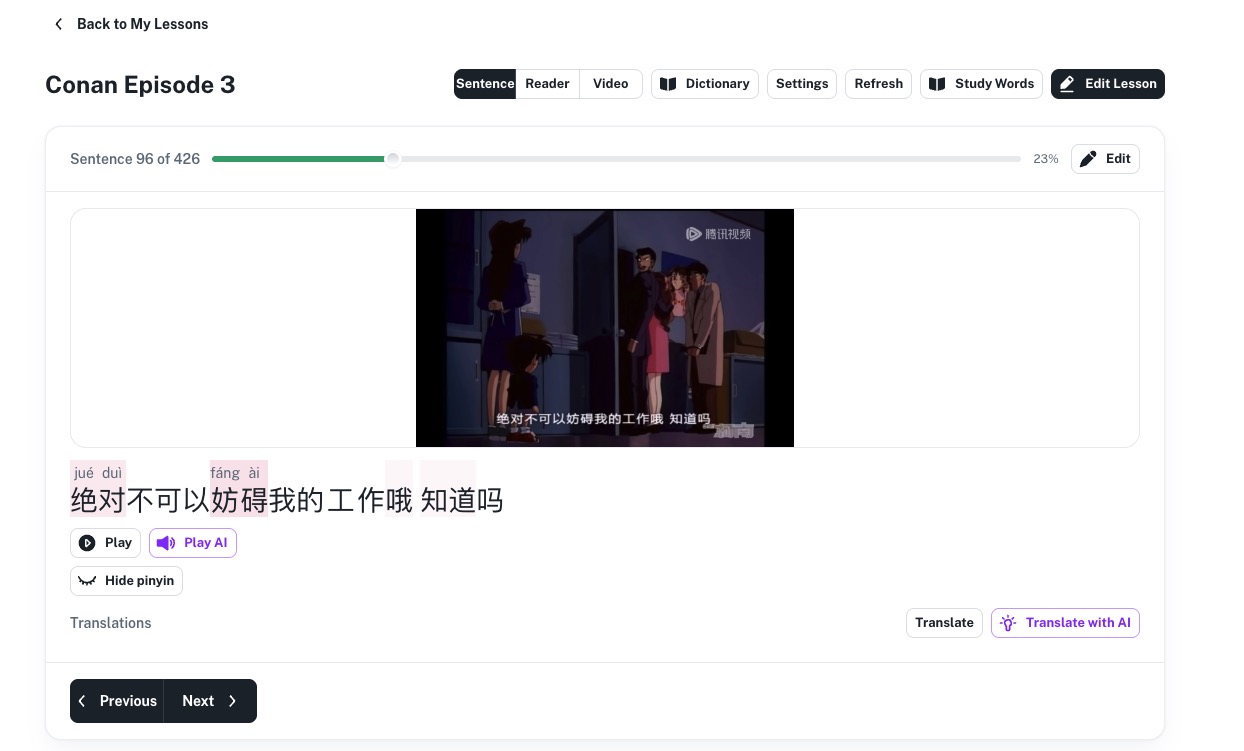
Screenshot: A sentence-focused lesson view showing progress through a 426-sentence lesson, an extracted frame from the source video, pinyin above the text, playback controls, and both standard and AI translation options.
That same lesson can be switched into synced video mode, where the learner watches the original clip while keeping the active sentence, pinyin, and translation tools directly underneath the player.
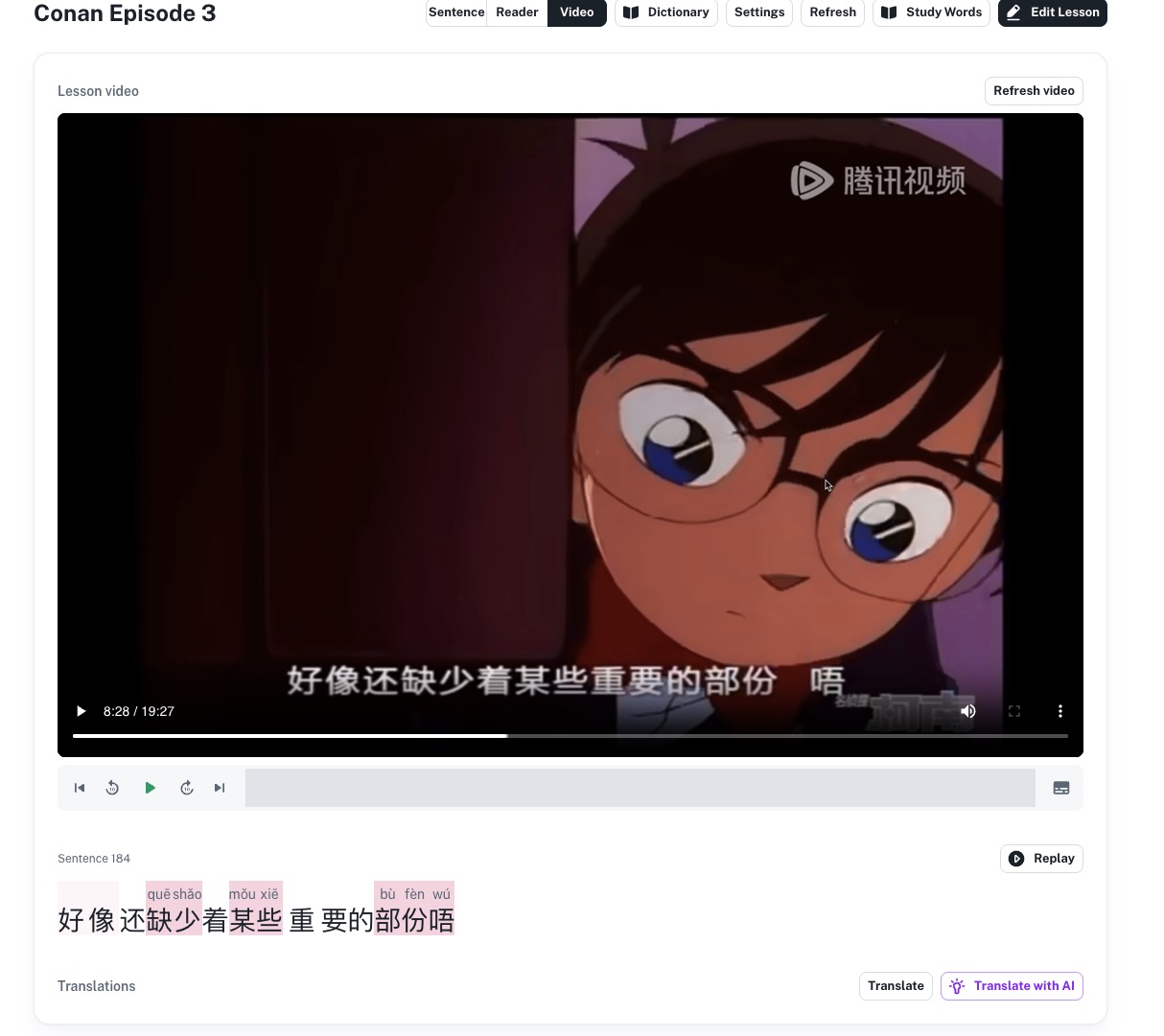
Screenshot: The video lesson surface ties the original media back to the extracted lesson content, with a synced playback bar, replay controls, token-level pinyin, and translation actions anchored to the current sentence.
Architecture
HuiStack is organized as a monorepo with a Next.js frontend and a Django REST backend.
On the frontend, I use Next.js 15, React 19, TypeScript, Material UI, React Hook Form, and Zod. The application is built around a few main surfaces: lesson creation, lesson playback, lesson editing, dictionary lookup, and study mode. The UI keeps vocabulary, media, and learner progress tightly connected, so clicking into a word from a lesson can open examples, notes, explanations, pronunciation, and study actions without losing context.
On the backend, I use Django, Django REST Framework, SimpleJWT, Djoser, PostgreSQL, and django-storages with boto3. The backend is split into focused apps for accounts, dictionary, lessons, progress, and media. The lessons app handles ingestion pipelines, sentence creation, retokenization, translations, audio generation jobs, video frame extraction, public lesson forking, and playlist organization. The dictionary app manages lemma and sense data, cached example generation, AI explanations, pronunciation, and sentence feedback. The progress app stores user familiarity, notes, viewed sentences, and lesson progress so learning state persists across the platform.
For Chinese processing, HuiStack supports both a traditional tokenizer path and an LLM-assisted parsing path. For audio and speech features, it integrates ElevenLabs for generated pronunciation and lesson audio. For video ingestion, it orchestrates direct upload, subtitle extraction, SRT processing, ffmpeg audio extraction, and frame generation into one asynchronous pipeline.
Study and review are first-class parts of the architecture rather than an afterthought. Vocabulary extracted from lessons can immediately flow into filtered study queues and exported review decks.
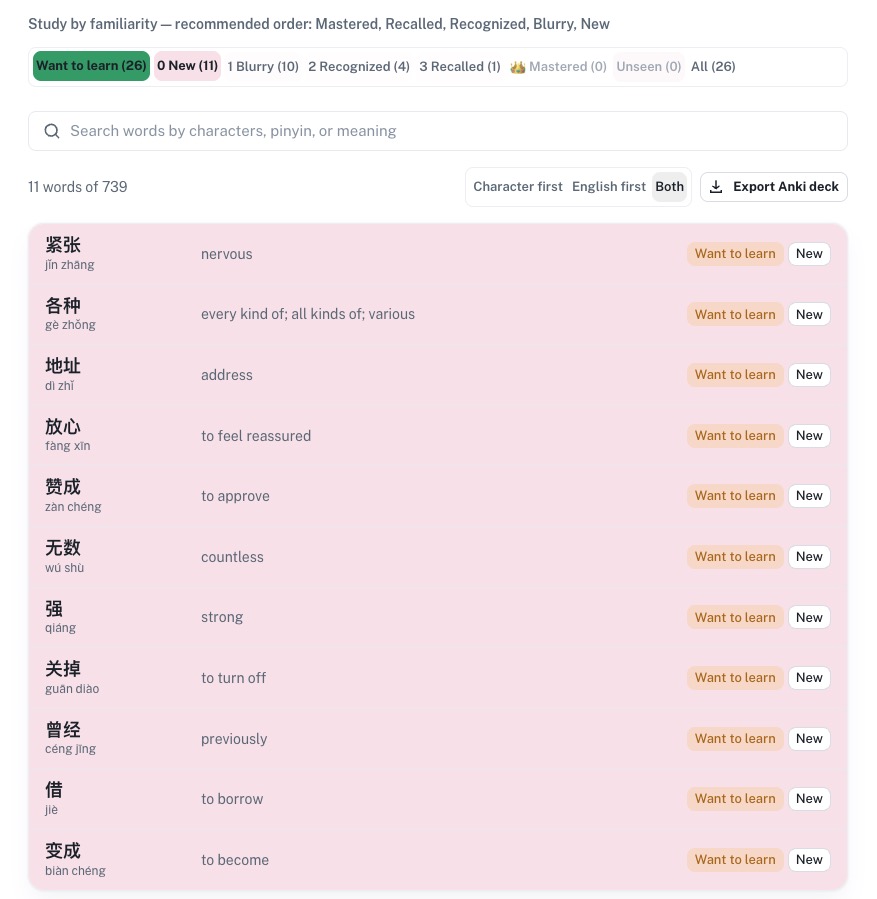
Screenshot: The study words view groups lesson vocabulary by familiarity level, supports searching by hanzi, pinyin, or meaning, lets the learner switch card direction, and exports the selected set as an Anki deck.
Deployment
The production stack runs on a Hetzner VPS with Dokploy managing deployments. I use Git-based automatic builds so pushes can flow directly into rebuilds and releases. PostgreSQL runs in a container with persistent storage and automated backups, which keeps the database operationally simple while still production-ready. Media delivery is moving through S3-compatible object storage, which is important because HuiStack stores uploaded video, extracted audio, generated lesson audio, frame images, and pronunciation assets. The application already uses presigned URLs, structured storage keys, and multipart uploads, so large media handling is built into the architecture rather than bolted on later.
I also keep separate development and production environments. On the backend, the environment and database target are configurable, which lets me switch between local SQLite, local PostgreSQL, remote development PostgreSQL, and production PostgreSQL without changing application code. The frontend points at the correct API through environment variables, and auth behavior is configurable for local HTTP development versus production cookies and domains.
Because learner progress is persisted across the platform, I also built a stats surface that makes the data visible instead of leaving it buried in tables. That helps validate whether the ranking and review systems are actually producing useful habits over time.
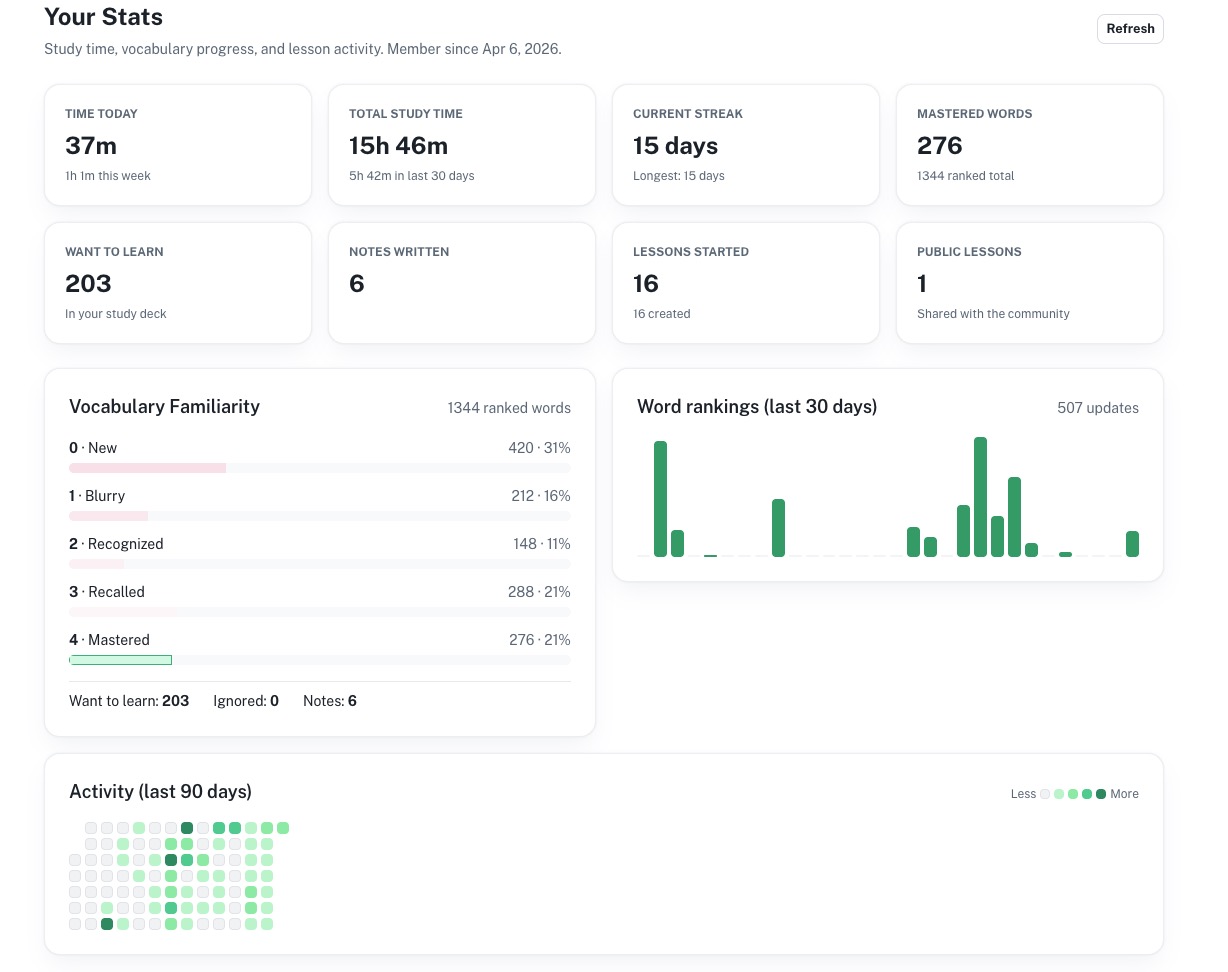
Screenshot: The stats dashboard summarizes study time, streaks, vocabulary rankings, mastered words, lesson activity, and a contribution-style heatmap so learners can see both short-term consistency and long-term progress.
AI-Assisted Development Workflow
One of the more interesting parts of the project is the development workflow around Claude Code. I built a repeatable flow where a Claude Code message can create a Jira ticket and feature branch, then agents iterate on implementation across the monorepo. Playwright is used to validate flows in the browser, record test videos, and produce artifacts that can be attached back to the Jira ticket and pull request.
That turns AI assistance into something much closer to an engineering system than a chat toy. The workflow does not stop at code generation: it creates work items, scopes changes, runs browser checks, captures evidence, and feeds results back into the review process. For a product like HuiStack, where features often span frontend UX, backend APIs, media processing, and auth state, that automation makes iteration much faster and much more reliable.